
Keep your own website and let Taskpipe run the course
Use your existing website to show course groups and collect interest, while Taskpipe manages student access, lessons and progress.
You may already have a website that works for your business. Your audience knows it, your course pages sound like you, and you do not want to move everything to start teaching online.
Taskpipe can work behind that website. Your site helps people find the right course; Taskpipe gives your students a place to learn and your team a place to manage their progress.
This is often called headless mode. Your site helps visitors choose a course, then sends them to Taskpipe to enrol, pay and learn.
Show your course groups on your own site
Your website can show your published groups, including dates, location and available seats. You choose which groups it can list.
If you run a coaching programme several times a year, your site can show the available groups. If you teach in person as well as online, it can help visitors choose a city or venue.
You manage those group details in Taskpipe. Your developer can connect your website to those details, so you only need to update them in one place.
Draft and closed groups stay out of those results.
Collect interest before someone is ready to join
A form on your own site can send a lead to Taskpipe and link it to the group they are interested in. An email address or phone number is enough to get started.
This is useful for a course where people ask a question or speak to you before buying. Your team can follow up in the Leads area instead of keeping a separate list of form replies.
If your form asks whether someone wants marketing messages, the connection can save their answer too.
A lead does not have course access and does not reserve a seat. Treat it as the start of a conversation.
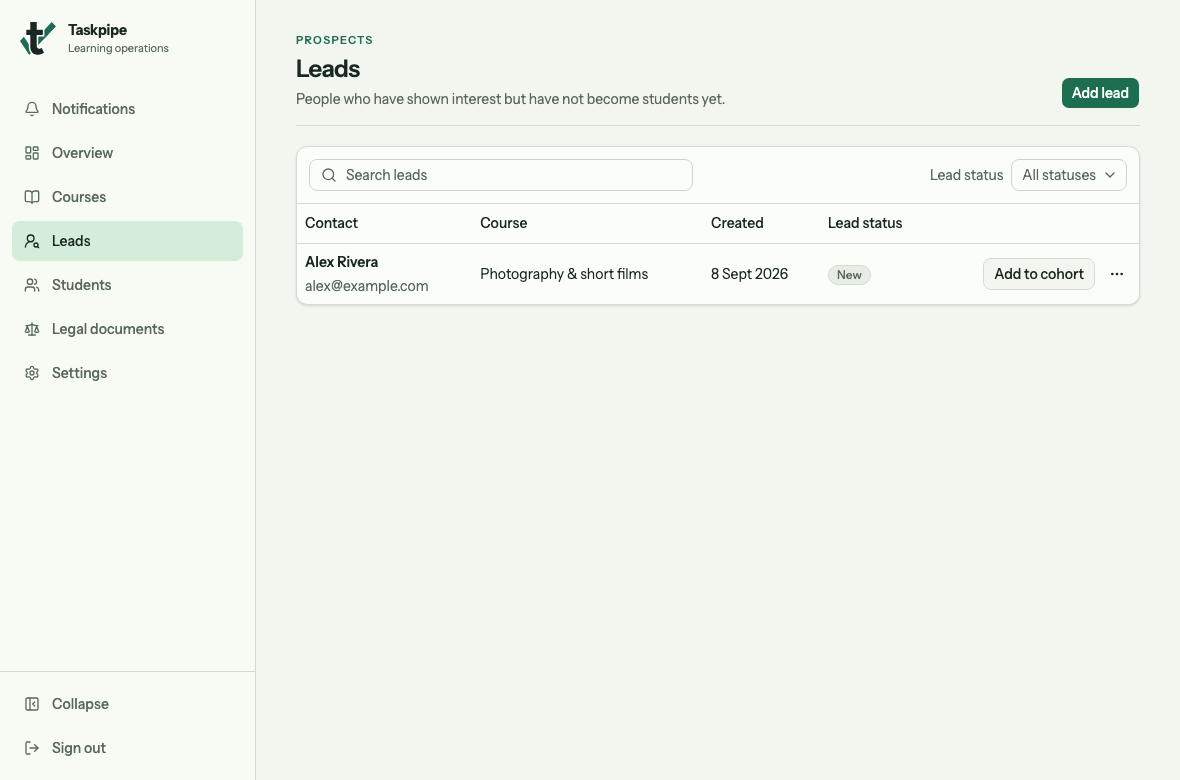
Check the contact details and course against the enquiry sent from your website.
Send students to the course page
Send visitors to the Taskpipe public course page to enrol and pay. Taskpipe checks the payment before giving course access and sending the access email.
Owners and managers can also add a student at no charge from Taskpipe.
Set up a connection for course lists and enquiries
For a first connection, let visitors choose a group and send an enquiry on your website, then send them to the Taskpipe course page to enrol. Your developer will connect the website; you choose what it can access.
As the organization owner:
- Open Settings → API access.
- Enter Course website in Key name, so you can recognise the connection later.
- Select Read cohorts and seat availability to let the site show your published, listed groups.
- Select Register leads to let your enquiry form send interested people to Taskpipe.
These two permissions let the website show groups and collect enquiries.
Select Create API key when the choices are right. The key is shown once. Save it securely and share it privately with your developer, who should keep it on the website’s server. You can turn off the key in settings.
Test the customer journey
Before sharing your website, check the connection together:
- Open your website and find a published group. Compare its dates and available seats with Taskpipe.
- Send a test enquiry and check that it appears in Leads for the right course.
- Follow the enrolment link and check that it opens that group’s Taskpipe course page.
- Test your enrolment flow and confirm that the student can open the right course.
Ask your developer to handle full groups and repeated form submissions too.
Choose the right starting point
If you are starting from scratch, the standard Taskpipe setup gets you a public course page and a student experience with fewer parts to connect.
If your website is already an important part of your business, the integrations let you keep it while Taskpipe handles course delivery. The connection covers course listings and leads. Students still learn in Taskpipe; building a separate learning area on your own site is outside the current connection.
You can also use your own domain and custom styles for your course site. Read the latest product update.